A demonic invasion has overwhelmed the Union Aerospace Corporation’s Mars research facility. As one of only a few survivors, you must fight your way to hell and back against a horde of demons in this award-winning horror/action FPS and reimagining of the original DOOM.
Required
- DOOM 3 BFG (Steam or GOG)
- DOOM 3 BFG DX12 by Robert Beckebans
- D3 HDP Lite for BFG EDITION by H3llbaron
Optional
How to install
Engine
- Create a new folder (eg: RBDOOM3BFG).
- !!!VERY IMPORTANT!!! Copy the original DOOM 3 BFG base folder (\steamapps\common\DOOM 3 BFG Edition\base) over into your RBDoom3BFG install (\RBDOOM3BFG). Without that, the game won’t start.
- Download the 1.3.0 from ModDB Here and extract it in the previously created folder
- Download the patch in the form of a 7zip file mentionned above and do the same as with 1.3.0. Overwrite when prompted.
Textures
- Download the pack from the link above.
- Extract the pack in the same folder you installed the engine.
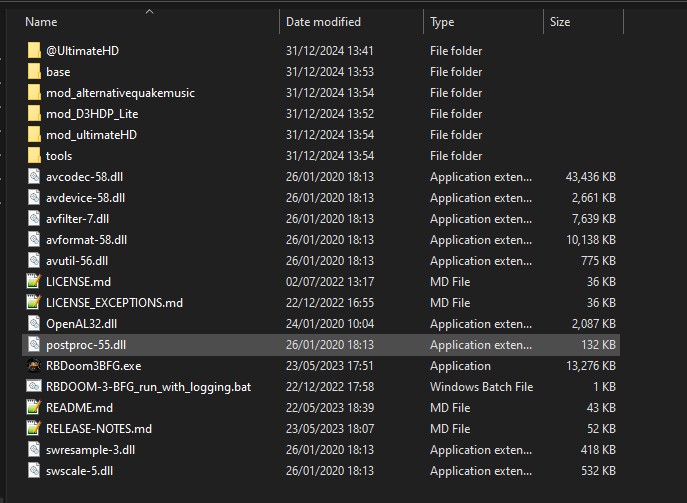
You should end up something like this.
Keybinds
You will need to start the game once by clicking twice on the file named run_onRBDoom3.bat located in \RBDOOM3BFG\mod_D3HDP_Lite.
Then, head to C:\Users\<username>\Saved Games\id Software\RBDOOM 3 BFG\base and create a new file called myconfig.cfg. Copy and paste the following block of text and save it.
bind KP_PLUS cvaradd g_fov 1 //Add 1 to FOVV
bind KP_MINUS cvaradd g_fov -1 //Sub 1 to FOV
bind KP_ADD cvaradd g_fov 1 //Add 1 to FOV
bind KP_STAR g_fov 90 //Set FOV to 90
bind KP_INS toggle g_stoptime 1 0 //Pause game but not player
bind DEL toggle g_showhud //Hide HUD
bind HOME toggle ui_showgun //Hide gun
bind INS noclip //Enable no clip to move the camera around
Controls
| Key | Effect |
|---|---|
| LS | Forward/ Backward/ Left/ Right |
| RS | Pitch/ Yaw |
| A | Camera Up |
| RS Pressed | Camera Down |
| Numpad * | Reset FOV |
| Numpad - | Decrease FOV |
| Numpad + | Increase FOV |
| Insert | Toggle No Clip |
| Deleted | Hide/ Show HUD |
| Home | Hide/ Show Gun |
| Numpad 0 | Stop/ Start Time |
How To Take A Screenshot
When the game is started and a maps loaded, press the tilde (~) to open the console.
Type exec myconfig.cfg. This should load your keybinds. There should be no error reported in the console output.
Test by pressing Numpad 0 twice. If the game stop and restart, you should be good.
Follow the controls above to take shots.